

You want tools that let you scale collaboration, reduce repetitive work, and keep client projects organized. FuseBase promises to do exactly that by letting you automate teamwork, client collaboration, and busywork in secure, AI-powered workspaces. This review explains why FuseBase matters to your business, what it does well, and where you should be cautious so you can decide whether it will save you time and help you deliver more consistent client outcomes.
TL;DR
|
Feature |
Verdict |
|---|---|
|
Ease of Use |
⭐️⭐️⭐️⭐️ – Fast capture and a clean interface make onboarding quick ⏱️ |
|
Value |
💸 – Robust feature set for $79; strong ROI if you use portals and automation |
|
Collaboration |
🤝 – Portals, shared notes and password-protected public pages make client work straightforward |
|
Automation & AI |
🤖 – 24/7 agents and AI features speed repetitive tasks and note capture |
|
Support & Compliance |
🔧 ⭐️⭐️ – Mixed support experiences and BAA delays mean you should confirm HIPAA needs before committing |
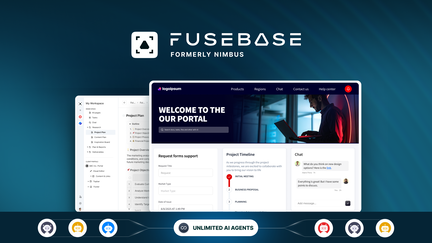
FuseBase feels like a work hub you actually want to use. You can capture web pages, convert images to text, record audio and video, scan documents, and build password-protected portals to share work with clients or teammates.
In daily use it’s great for note-taking, to‑do management, and sharing lessons or client briefs. For special occasions — like client onboarding or workshop follow-ups — the portals and public pages make distribution tidy and secure.
If you’re trying to reduce busywork and keep everything in one place, it’s worth trying, especially at the $79 price point.
What People Say
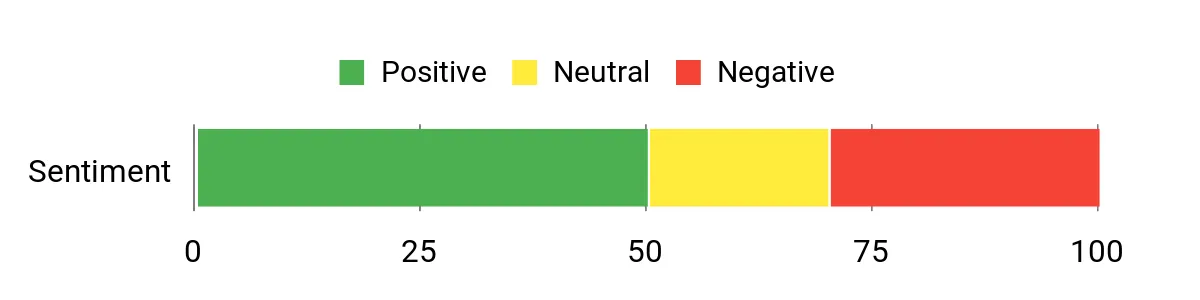
Customers praise FuseBase for real-world productivity wins: fast capture, versatile note use, and handy sharing portals. At the same time, common complaints are about support response times and delays on things like BAAs for HIPAA use.
Overall Sentiment: Mixed
🗣️ Avinash.Katta
One Pinned tab on my browser is always Fusebase. I have been using for many use cases that were not even discussed. I publish content/reviews using it. I create and Share notes with my students. I use it for my Client’s website content… I use the Image to Text feature converting screenshots into notes. Speed: The speed of the tool is significantly faster… Capture: The web capture feature proves to be truly impressive… Unrestricted Video and Audio Recording. Document Scanner. Portals. password-protected public pages.
🗣️ 115766246339514840661
Incrível. O melhor investimento que fiz no appsumo em tempos. Minha gestão mudou. Totalmente game changer.
|
Pros |
Cons |
|---|---|
|
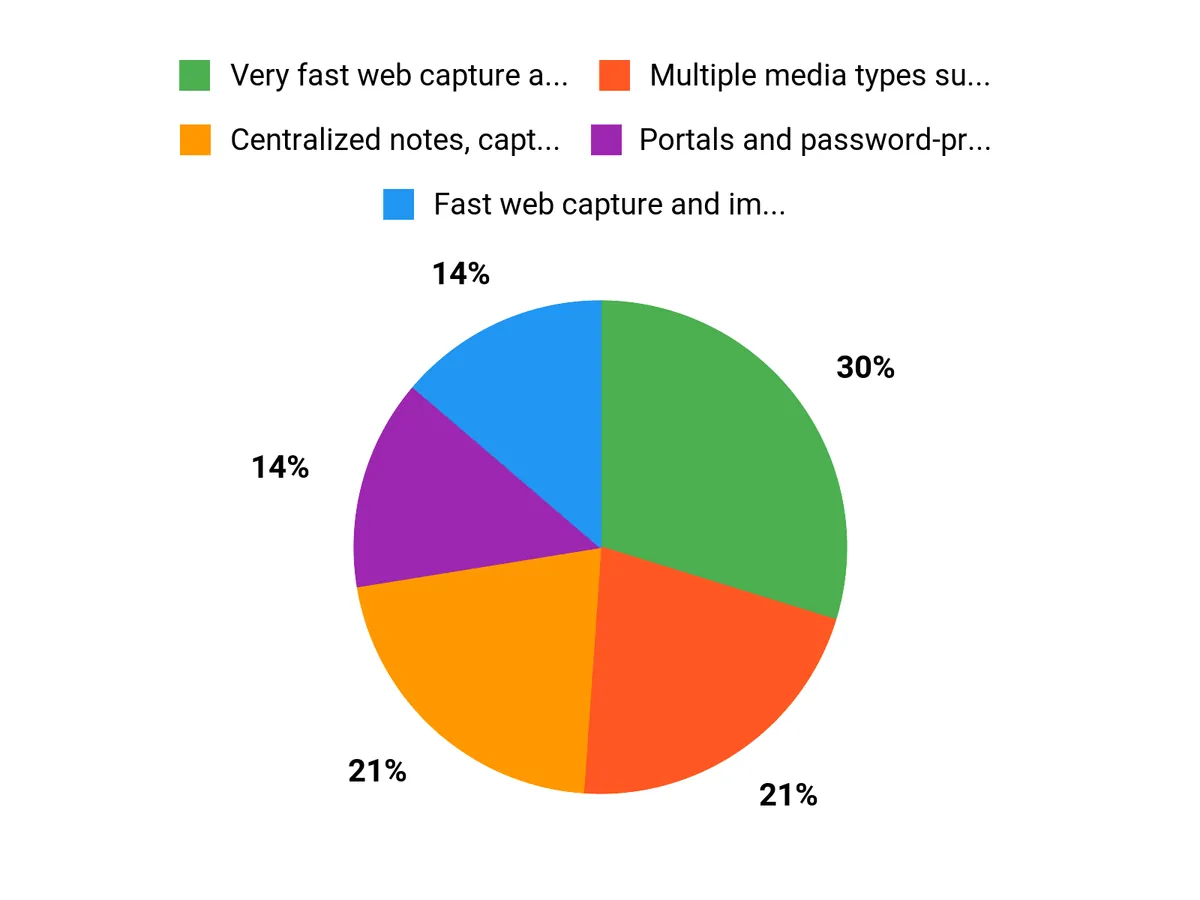
✅ Very fast web capture and content saving |
❌ Support responsiveness can be inconsistent |
|
✅ Multiple media types supported (audio, video, scans) |
❌ Delays signing BAAs affected HIPAA use for some customers |
|
✅ Portals and password-protected pages make sharing secure |
❌ Some users report canceled demos or scheduling issues |
|
✅ Image-to-text feature speeds up note creation |
❌ Occasional confusing upgrade prompts in the app |
Long-Term Savings
By consolidating notes, client assets, and recordings into one workspace, you cut down on duplication and lost time. Over months this reduces billing headaches and file search time, which often offsets the upfront cost.
Return On Investment
If FuseBase helps you reclaim even a few hours a week that you’d otherwise spend hunting files or assembling materials, its $79 price can pay for itself quickly through increased efficiency and faster client turnaround.
Situational Benefits
|
Situation |
How It Helps |
|---|---|
|
Client Onboarding |
Create a portal with password-protected pages to share contracts, onboarding guides, and recordings in one secure place. |
|
Content Creation |
Use web capture and image-to-text to pull research and screenshots into editable notes for faster drafting. |
|
Workshops & Classes |
Record sessions, scan handouts, and distribute materials through a portal so attendees can access everything after the event. |
Ease Of Use
|
Feature |
Ease Level |
|---|---|
|
Setup |
Moderate |
|
Note Capture |
Easy |
|
Portal Creation |
Moderate |
Usability
|
Aspect |
Ease Level |
Notes |
|---|---|---|
|
Web App |
Easy |
Main workspace is responsive and quick for captures and notes. |
|
Mobile App |
Moderate |
Core features available but some users note occasional sync quirks. |
|
Sharing & Permissions |
Moderate |
Powerful options, but portal limits and prompts can be confusing at first. |
Integration Capabilities
|
Software |
Integration Quality |
|---|---|
|
Google Drive |
Good |
|
Slack |
Moderate |
|
Zapier |
Good |
|
Notion |
Limited |
Collaboration Features
You can share portals, create public pages with password protection, and collaborate on notes and tasks. It’s solid for client-facing workflows and internal team handoffs, as long as you verify plan limits and portal allocations.
Updates & Upgrades
The team has been actively responding to feedback; some users reported legal or BAA delays that affected HIPAA workflows, but the company has communicated steps to resolve those cases. Expect iterative improvements rather than overnight fixes.
Key Benefits
- Centralized notes, captures, and recordings
- Fast web capture and image-to-text conversion
- Password-protected public pages and portals
- Built-in document scanning and multimedia recording
Current Price: $79
Rating: 4.77 (total: 549+)
FAQ
Is FuseBase Worth The Investment For My Business?
You get a lot of functionality for a single upfront investment of $79, including AI-powered workspaces, web capture, unrestricted audio/video recording, document scanning, and password-protected public pages that let you share securely. If you want to cut busywork, centralize client collaboration, and replace multiple point tools, FuseBase can deliver fast ROI by speeding content creation and automating routine processes.
Expect a short learning curve; you’ll see the biggest gains when you start with a focused pilot (one team or use case) to prove value, then scale portals and agents as adoption grows. Be realistic about early-stage support hiccups reported by some users and plan onboarding time into your rollout so you capture the productivity wins.
How Does FuseBase Handle Security, HIPAA, And Data Ownership?
Security features like password-protected pages and workspace controls help you manage access, but if you plan to store protected health information you must verify HIPAA readiness first because some users reported delays obtaining a signed BAA. Before you move PHI or sensitive client data, request a BAA and confirm the legal terms; treat the product as non-HIPAA until the agreement is signed.
You should also export critical records regularly and keep local backups during your initial setup, and confirm encryption, retention, and deletion policies with the vendor so you retain clear data ownership and compliance.
What Should I Expect From Support And How Do I Onboard Efficiently?
Expect a mix: many users praise responsiveness and improvements, while others noted canceled demos or misrouted account setup due to multi-organization complexity — so plan proactively. To speed onboarding, open a support ticket with your order details and organization name, ask for a guided demo focused on your key workflows, assign a single admin to configure portals, and start with a pilot workspace to validate integrations and permissions before full rollout. If you hit delays, follow up with screenshots and exact steps so support can reproduce issues quickly; persistence up front will help you unlock the platform’s collaboration and automation benefits sooner.
Why Choose FuseBase
Choose FuseBase because it streamlines complex workflows with intuitive integrations and reliable performance, so you can scale operations without added IT overhead. With fast onboarding, strong security, and responsive support, youll get quicker time-to-value and the confidence that your business can grow efficiently.
Wrapping Up
FuseBase can help you automate workflows and centralize client collaboration at a sensible cost. The platform’s strengths include fast web capture, robust sharing portals, unrestricted audio/video recording, a document scanner, and AI/agent automation — all available for a one-time AppSumo price of $79. You should be aware of mixed user reports around live support responsiveness and delays signing BAAs for HIPAA use; if HIPAA compliance or guaranteed demo access matters to you, confirm those specifics before buying. Overall, FuseBase offers powerful automation and collaboration for $79, making it a strong option if you want to reduce busywork and scale client-facing work, but verify support and compliance details if those are mission-critical to your business.
This Roundup is reader-supported. When you click through links we may earn a referral commission on qualifying purchases.